
AWS Transform: Accelerating Application Modernization from Source Code to Containers using AI Agents
AWS Outposts- Extending AWS to your On-Premises and Edge Locations
April 25, 2026Introduction
Modernizing applications from monolithic architectures to containers is no longer a slow. Yet the reality is that the majority of project time and cost spent converting applications to containers goes into two activities: writing Dockerfiles and generating Helm templates/Infrastructure as Code. These tasks require deep container expertise that most application teams simply don’t have.
AWS Transform changes this equation entirely. As the first agentic AI service built to accelerate enterprise transformations, AWS Transform now offers Source Code to Containerization an AI-powered capability that takes your application source code and automatically produces production-ready container images, Dockerfiles, Helm charts, and Terraform modules, all through a web-based, chat-driven experience.
What are AWS Transform features
AWS Transform’s containerization agent supports the full modernization spectrum:
- Source Code to Containers — Analyze your application source code and automatically generate Docker artifacts, container images, and deployment infrastructure
- Java Upgrades — Upgrade legacy Java applications (e.g., Java 8 to Java 21) with automated dependency updates, API migrations, and framework modernization
- NET Framework to .NET Core — Transform .NET Framework Windows applications to cross-platform .NET, reducing operating costs up to 40% by running on Linux
- Custom Modernization with ATX CLI — AWS Transform custom enables reusable, CLI-driven code transformations for upgrading runtimes, SDKs, and frameworks consistently across large portfolios. Using the `atx` CLI, you can define custom transformation definitions, publish them to a shared registry with `atx custom def publish`, and make them available for other developers across your organization to discover (`atx custom def list`) and execute (`atx custom def exec`). This creates a powerful flywheel: one team authors a transformation, publishes it to the registry, and every other team in the organization can apply it at scale — ensuring consistency and reducing duplicated effort across hundreds of repositories
In this blog will focus on Source Code to Containers
Why This Matters
Manual containerization requires deep expertise. You need to:
– Analyze code dependencies
– Write Dockerfiles
– Establish container registries
– Configure deployment targets
– Create Infrastructure as Code (IaC) and CI/CD pipelines
– Integrate source control and perform security scanning
Each component adds complexity, expertise requirements, and time. The process can take multiple days per application even for experienced engineers. If you’re managing hundreds or thousands of applications, this timeline can exceed your data center exit deadlines.
AWS Transform automates the heavy lifting, enabling you to migrate and modernize in parallel — reducing the time and complexity of moving from on-premises to cloud-native architectures.
Key Features
– Web-Based Experience— Run everything through the AWS Transform console with a chat-based, agentic workflow
– Connect to Source Code Repos — Supports GitHub, GitLab, Bitbucket, GitHub Enterprise Server, or upload .zip files
– Multi-Project Support — Containerize a single repository or multiple repositories in a single workflow multiple zip uploads
– AI-Driven Source Code Analysis — Automatically analyzes frameworks, dependencies, and runtime requirements
– Docker Image Generation — Generates production-ready Dockerfiles and builds container images with integrated CVE security scanning
– Amazon ECR Integration — Publishes container images directly to Amazon Elastic Container Registry
– Helm Charts & Terraform Modules — Generates deployment-ready Infrastructure as Code for Amazon EKS (Helm charts) or Amazon ECS (Terraform)
– Private Dependency Support — Configure AWS CodeArtifact repositories (Maven, PyPI, npm) and private ECR base images
– Automated Security Scanning— Identifies vulnerabilities before images are published to production
Getting Started with AWS Transform Source Code to Containerization
Here’s how to get started:
Prerequistes: EKS Cluster and required addons need to be pre-created. Refer to this blog I created before EKS Cluster
My recommendation is use web based transform from AWS Console for source code to containers/ Migraitons. Code upgrade use AWS Trnasnform cli ( atx )
Step 1: Log in to AWS Transform
- Navigate to the AWS Transform service in the console after sign in
- Add users – users come from AWS Identity center
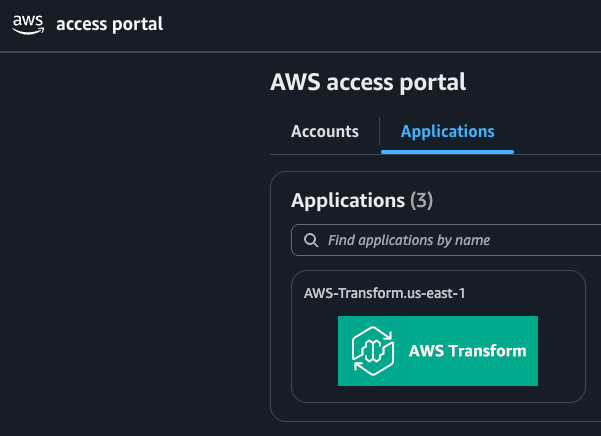
- Go to settings page in trasnform service copy the url and sigin or Use AWS SSO Portal like below to login
Step 2: Create a Workspace
Select an existing workspace or create a new one. A workspace is a logical container where you create and manage transformation jobs.
Step 3: Create a Job
Within your workspace, create a new job. Select Migration → VMware Migration → Source Code Containerization. This connects you with the containerization agent.

Step 4: Connect to Your Repository
Set up a connector to your source code repository using AWS CodeConnections. The agent supports:
– GitHub
– GitLab
– Bitbucket
– GitHub Enterprise Server
– Zip file uploads
Provide the ARN of an existing CodeConnections resource, or create one from the Developer Tools console. An admin with proper IAM permissions must approve the connector request.
Step 5: Convert to Docker Files
Once your code is available, the containerization agent:
– Performs an initial analysis of your source code
– Identifies frameworks, dependencies, and runtime requirements
– Flags security vulnerabilities (e.g., hard-coded passwords)
– Generates a Dockerfile and supporting artifacts
– Builds the container image using Amazon Linux 2023 as the default base image (fully customizable)
Step 6: Push to Amazon ECR
After reviewing and approving the Docker artifacts (human-in-the-loop approval), the agent:
– Publishes the container image to Amazon ECR
– Automatically creates an appropriate repository
– Runs security scans for known CVEs
– Provides scan results for review before production deployment
Step 7: Pull Locally and Validate
Pull the container image from ECR to your local environment. Verify the containerized application is working correctly — test endpoints, validate configurations, and confirm expected behavior.
Step 8: Generate Helm Templates / IaC
AWS Transform generates Infrastructure as Code for your target deployment:
– For Amazon ECS: Generates Terraform IaC artifacts that provision an ECS cluster with task definitions, service load balancing, and Fargate deployment
The generated artifacts are production-ready, including:
– Multi-AZ high availability
– Load balancing
– Secrets management (AWS Secrets Manager)
– Logging (Amazon CloudWatch)
Step 9: Download Templates and Deploy Locally
Download the generated Helm charts or Terraform modules. Deploy to your local or test environment to EKS/ECS validate the full infrastructure stack works as expected.
Step 10: Perform the Test and Prod Cutover
Once testing is complete, deploy the cutover infrastructure to production. The agent supports deploying your containerized application to the production environment with all the infrastructure components in place.
The Default Nine-Step Workflow
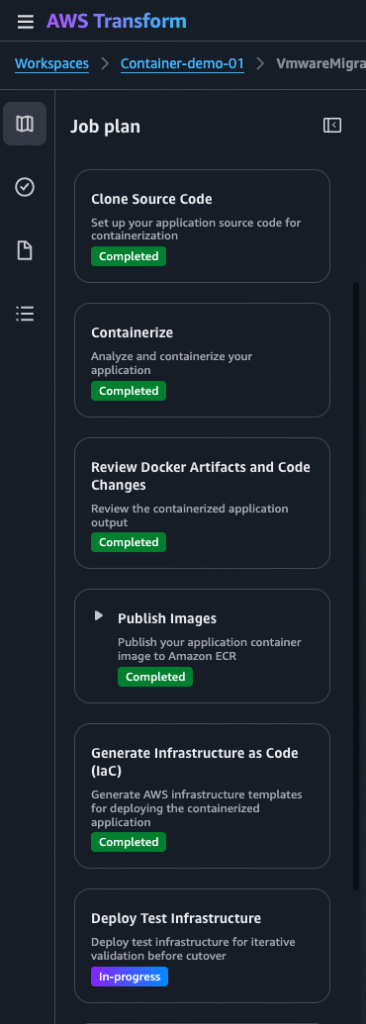
AWS Transform’s Source Code Containerization workflow includes these default steps (customizable via chat):
1. Review Security Disclaimer — Accept security guidelines
2. Clone Source Code — Connect to your Git repository and clone your application
3. Containerize — Analyze source code and generate Dockerfiles and container configurations
4. Review Docker Artifacts — Review generated artifacts before publishing
5. Publish Images — Build and publish container images to Amazon ECR
6. Generate Infrastructure as Code — Generate Helm/Terraform templates for deployment
7. Deploy Test Infrastructure — Deploy to a test environment for validation
8. Cleanup Test Infrastructure — Tear down the test environment after validation
9. Deploy Cutover Infrastructure — Deploy to the production environment
Summary:
The majority of time and cost in containerization projects is spent writing Dockerfiles and generating Helm templates — exactly what AWS Transform automates. By leveraging agentic AI with curated skills and AWS best practices, AWS Transform eliminates the manual toil and deep container expertise traditionally required.
Whether you’re modernizing Java applications, migrating .NET Framework to .NET Core, or simply replatforming monolithic applications into containers, AWS Transform provides a unified, web-based experience that takes you from source code to production-ready containers in minutes rather than days.
Get started today — open the AWS Transform console, create a workspace, and start your Source Code Containerization job.
—
AWS Transform is available in all AWS Regions where the service is offered. For more information, visit the [AWS Trasnform User Guide]
